 SimplyShot
Record anything. One bar to start.
Pick a screen, a window, or an area. Bring your camera and mic, then hit Record. Everything else is under ⋯.
- Quality Compact, Balanced, or Best
- Frame rate 24, 30, or 60 fps
- Export size Original, or 720p up to 4K
- Countdown 3, 5, or 10 s
- Background added on export
- Desktop hide icons, dim the screen
Turn a quick recording into a video worth sharing.
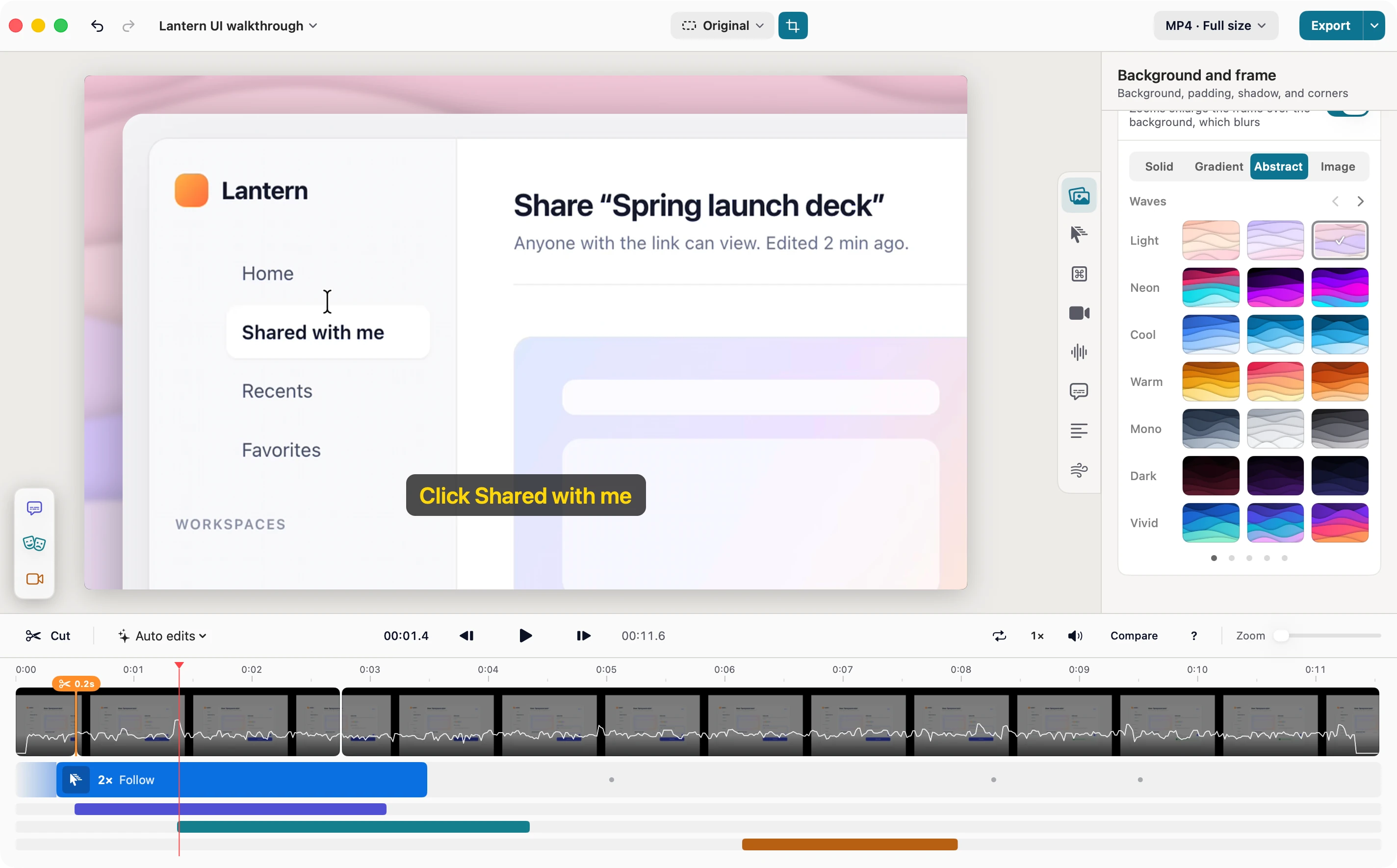
Open a recording in Studio and zooms are already waiting where you clicked and typed. Add captions and a background, cut the slow parts, and share something that looks produced, not just captured.
Cuts, zooms, and captions sit on one clear timeline, with your background and frame a click away. You see each change as you make it.
Studio suggests a zoom for every stretch of clicks and typing, so people see exactly what you did. Keep, move, or delete any of them.
Word-by-word captions from your microphone, made on your Mac. Fix any word, pick a style, and get an SRT file with your video.
Put it on the same backdrops as your screenshots, then pick a shape for YouTube, Reels, or a square post. Crop to fit.
Export an MP4 or a GIF at the size you need. Save the project and come back to it anytime.
- Home
- Shared with me
- Recents
- Favorites
- Product
- Brand
- Launch 2026
Anyone with the link can view. Edited 2 min ago.
Lantern keeps the file in sync, so everyone sees the latest version.
- Home
- Shared with me
- Recents
- Favorites
- Product
- Brand
- Launch 2026
Anyone with the link can view. Edited 2 min ago.
Lantern keeps the file in sync, so everyone sees the latest version.
Addaquicknotefortheteam,
- Home
- Shared with me
- Recents
- Favorites
- Product
- Brand
- Launch 2026
Anyone with the link can view. Edited 2 min ago.
Lantern keeps the file in sync, so everyone sees the latest version.
- Home
- Shared with me
- Recents
- Favorites
- Product
- Brand
- Launch 2026
Anyone with the link can view. Edited 2 min ago.
Lantern keeps the file in sync, so everyone sees the latest version.
- Quality
- Compact, Balanced, or Best
- FPS
- 15 to 60
- Resolution
- Full size, or 480p up to 4K
- Format
- Greater compatibility or Smaller file size
- Home
- Shared with me
- Recents
- Favorites
- Product
- Brand
- Launch 2026
Anyone with the link can view. Edited 2 min ago.
Lantern keeps the file in sync, so everyone sees the latest version.
- FPS
- 5 to 60
- Max size
- 200 to 1200 px, or Original
- Quality
- 25 to 100
- Optimize size
- On or off
Stay out of the way.
A small bar floats while you record. Pause, start over, or wrap up in one click.
- Off camera It never shows up in your recording
- Out of your way Drag it anywhere on screen
- No oops Restart and Delete ask first. Esc backs out.
Show every click.
Clicks ring and shortcuts pop up as you press them, so nobody gets lost.
- Clicks Outline or Filled, 9 colors
- Keys shown Command Keys or All Keys
- Keystrokes Dark or Light, 6 positions
- Home
- Shared with me
- Recents
- Favorites
- Product
- Brand
- Launch 2026
Anyone with the link can view. Edited 2 min ago.
Lantern keeps the file in sync, so everyone sees the latest version.
Studio does the first edit.
One menu zooms in on the action, finds the pauses, and speeds up the typing.
- Auto Zoom
- Zooms in where you clicked and typed. Subtle, Normal, or Close.
- Find Pauses
- Spots the quiet bits. Cut them all at once.
- Speed Up Typing
- Plays every stretch of typing at 4×.
- Make Captions
- Turns what you said into captions.
Change the shot, mid-video.
Start in a bubble, drop your background, sit side by side with your screen, then take the whole frame. Switch layouts anywhere on the timeline, and Follow face keeps you centered as you move.
- Camera overlay
- Remove background
- Split screen
- Full screen camera
- Hide camera
- Home
- Shared with me
- Recents
- Favorites
- Product
- Brand
- Launch 2026
Anyone with the link can view. Edited 2 min ago.
Lantern keeps the file in sync, so everyone sees the latest version.

Captions that write themselves.
Made from what you said, right on your Mac. Nothing leaves it.
- Home
- Shared with me
- Recents
- Favorites
- Product
- Brand
- Launch 2026
Anyone with the link can view. Edited 2 min ago.
Lantern keeps the file in sync, so everyone sees the latest version.
Addaquicknotefortheteam,
- Come in with Appear, Fade, Slide, Pop, Drop, Blur, or Typewriter
- Highlight Color, Box, Karaoke, or Underline
- Show Whole line or Word by word
- Background Dark, Light, or Shadow
- Font Sans-serif, Rounded, Serif, or Mono
- Position Bottom, Center, Top, or anywhere
- Save SRT or text
Add a quick note for the team, um, then send the link. 0.4s Everyone sees the latest version.
Edit the video like a document.
Cut a word and it’s gone from the video. Clear every “um” in one click, and trim the long pauses down to a breath.
Fine-tune everything.
Background, cursor, camera, audio, and more, each one click away.
Background and frame
Solid, gradient, abstract, or your own image.
Cursor
Smooth out shakes and hide it while you type.
Clicks & Keystrokes
Add a soft click sound.
Camera
Switch camera layouts partway through.
Audio
Clean up your voice. Music dips when you talk.
Captions
Word by word, with seven ways in.
Transcript
Edit the video by editing the words.
Animations
Tune the motion and add motion blur.
- Cut and split at the playhead
- Masks Blur, Pixelate, or Highlight
- Crop and canvas shapes
- Compare before and after
- Export MP4 or GIF
Ready to hit Record?
Download for MacmacOS 14.6+ No key needed to start.