 SimplyShot
The CleanShot alternative you can try for free.
Screenshots, screen recording and a video editor, like CleanShot. Plus captions made on your Mac, edits by transcript, sensitive info detection and uploads to your own storage.
Download for MacWhat you get on top of CleanShot.
All on your Mac. No account, no subscription.
Captions and transcript edits, made on your Mac
Studio writes captions from what you said, word by word or a line at a time, and saves them as SRT too. Then edit the video like a document: delete words to cut them, and clear the ums and long pauses in one click. Your audio never leaves your Mac.
More on captions- Home
- Shared with me
- Recents
- Favorites
- Product
- Brand
- Launch 2026
Anyone with the link can view. Edited 2 min ago.
Lantern keeps the file in sync, so everyone sees the latest version.
Addaquicknotefortheteam,
Camera layouts that change mid-video
Start in a bubble, then switch to split screen, full screen or a cutout with your background removed, anywhere on the timeline. Follow face keeps you centred as you move.
More on camera layouts- Home
- Shared with me
- Recents
- Favorites
- Product
- Brand
- Launch 2026
Anyone with the link can view. Edited 2 min ago.
Lantern keeps the file in sync, so everyone sees the latest version.
Private info, found before you share
Turn on detection and SimplyShot finds credentials, card numbers, emails, phone numbers, addresses, faces and barcodes in your screenshots. Nothing is hidden for you: review what it found and apply it in the Redact panel. It all runs on your Mac.
More on Sensitive info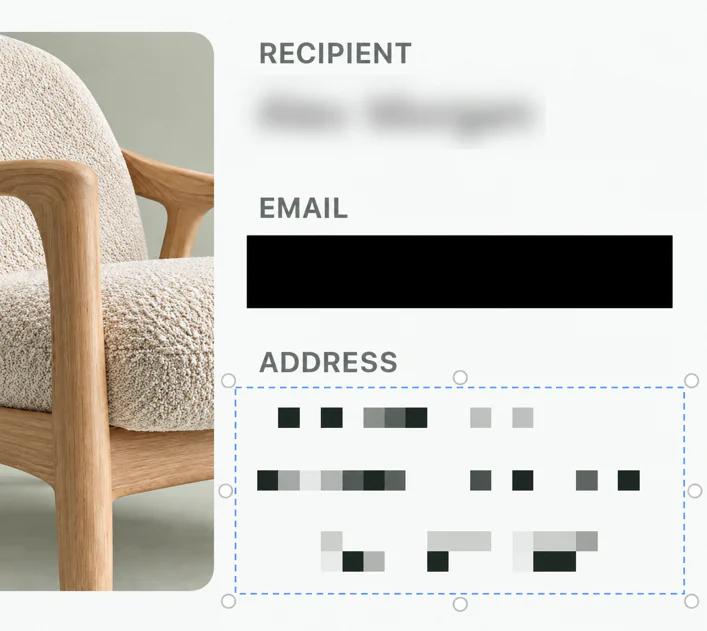
Upload to your own storage
Send screenshots and recordings to your own bucket and copy a public link, or one that expires. No SimplyShot account and no SimplyShot cloud: your files stay where you put them.
- AWS S3
- Cloudflare R2
- Backblaze B2
- DigitalOcean Spaces
- Any S3-compatible endpoint
SimplyShot and CleanShot, side by side.
What each app offers today.
| Feature | CleanShot X | SimplyShot |
|---|---|---|
| Area, window and screen capture | Yes | Yes |
| One bar for every capture mode | Yes | Yes |
| Scrolling capture, by hand or automatic | Yes | Yes |
| Magnifier and freeze the screen while you select | Yes | Yes |
| Screen recording, as video or GIF | Yes | Yes |
| Camera, microphone and Mac sound | Yes | Yes |
| Clicks and keystrokes on screen | Yes | Yes |
| Video editor with automatic zooms | Yes | Yes |
| Captions in the video | No | Made on your Mac |
| Transcripts | In CleanShot Cloud | On your Mac |
| Cut the video by deleting words | No | Yes |
| Clear filler words and long pauses | No | Yes |
| Camera layouts | Bubble or full screen | Bubble, split screen, full screen, background removed |
| Clean up your voice, add music | No | Yes |
| Blur or pixelate part of a video | No | Yes |
| Finds sensitive info for you | No | On your Mac, you review |
| Blur, pixelate and redact by hand | Yes | Yes |
| Copy text from images | Yes | Yes |
| Annotations, backgrounds and presets | Yes | Yes |
| Save a screenshot as a project to keep editing later | Yes | Yes |
| Recent captures on screen to copy, save or drag | Yes | Yes |
| Pin to the screen | Yes | Yes |
| Capture History | Yes | Yes |
| Search captures by the words in them | Uploads, in CleanShot Cloud | On your Mac |
| Where uploads go | CleanShot Cloud | Your own S3-compatible storage |
| Try before you buy | Money-back guarantee | Free trial |
| Price | $35 one-time, or $10 a month for Pro | $29, one payment |
CleanShot X features and prices as listed on cleanshot.com in October 2026.
CleanShot or SimplyShot?
CleanShot is enough if…
- Your team shares through CleanShot Cloud, with comments and sign-in for everyone.
- Your Mac can't run macOS 14.6 Sonoma or later.
- You already have it, or get it with Setapp.
Why people switch to SimplyShot
- Try it free first, then $29, one payment.
- A Studio that goes further: captions, transcript edits, camera layouts and cleaner audio, all on your Mac.
- Private info found before you share, and you review it.
- Your own storage, with no account or cloud to sign up for.
Switching from CleanShot.
The short answers.
Can I try SimplyShot before I buy?
Yes. Download it and try it free; no key is needed to start. After that, it's $29, one payment. No subscription.
Do I need a cloud account to share?
No. Upload to your own AWS S3, Cloudflare R2, Backblaze B2, DigitalOcean Spaces or any S3-compatible storage, and copy a public link or one that expires. There is no SimplyShot account and no SimplyShot cloud.
Does Studio add zooms for me?
Yes. When a recording first opens, Studio adds a zoom where you clicked and typed. Keep, move or delete any of them, or add your own.
Which Macs does it run on?
macOS 14.6 Sonoma or later, on Apple silicon and Intel.
Ready for your next shot?
Download for MacmacOS 14.6+ No key needed to start.