 SimplyShot
The Xnapper alternative that records your screen, too.
Polished screenshots with backgrounds and redaction, like Xnapper. Plus screen recording, a video editor, scrolling capture and uploads to your own storage.
Download for MacWhat you get on top of Xnapper.
One app for screenshots and video. No watermark while you try it.
Screen recordings that look as good as your screenshots
Record an area, a window or the whole screen as a video or a GIF, with your camera, microphone and your Mac's sound. Studio puts it on the same backgrounds, zooms in where you clicked and writes captions on your Mac.
More on recording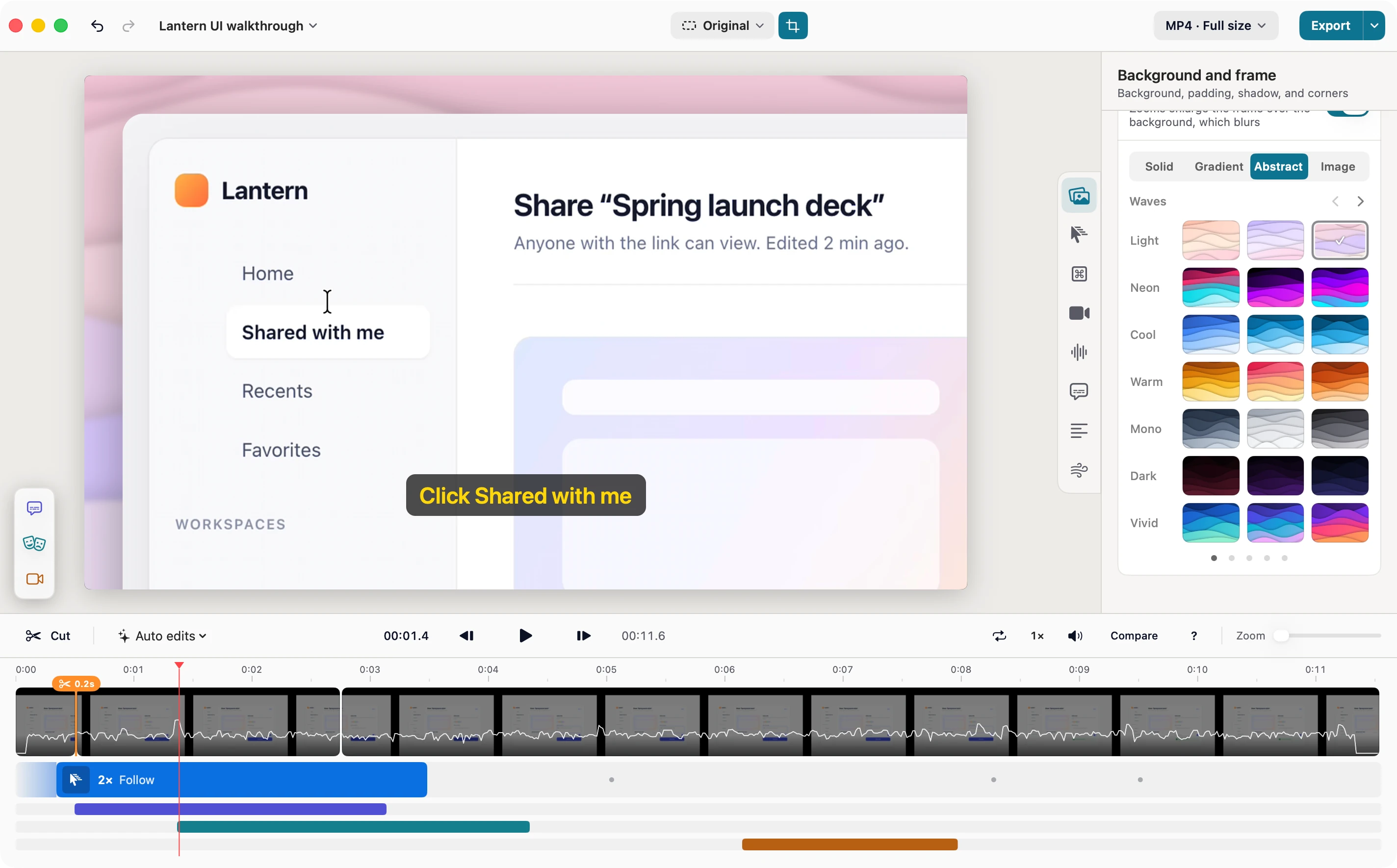
The whole page, not just what fits on screen
Scroll at your own pace, or let SimplyShot scroll for you: down, up, left or right. Long chats, full web pages and wide tables come out as one image, ready for a background.
More ways to explain
Beyond arrows and text: number your steps, highlight a line, put a spotlight on one part, or leave a sticky note and an emoji reaction. Save a screenshot as a project and keep editing it later.
More on screenshots
Share a link from your own storage
Upload screenshots and recordings to your own bucket and copy a public link, or one that expires. No SimplyShot account and no SimplyShot cloud.
- AWS S3
- Cloudflare R2
- Backblaze B2
- DigitalOcean Spaces
- Any S3-compatible endpoint
SimplyShot and Xnapper, side by side.
What each app offers today.
| Feature | Xnapper | SimplyShot |
|---|---|---|
| Area and window capture | Yes | Yes |
| Scrolling capture | No | Down, up, left and right |
| Screen recording, as video or GIF | No | Yes |
| Camera, microphone and Mac sound | No | Yes |
| Video editor with zooms, captions and transcript cuts | No | Studio |
| Backgrounds, padding, shadow and rounded corners | Yes | Yes |
| Sizes for social posts | Yes | 1:1, 4:5, 9:16, 16:9 and more |
| Saved presets | Yes | Yes |
| Finds sensitive info for you | Emails, cards, IP addresses, API keys | Also addresses, faces and barcodes |
| Blur, pixelate and redact by hand | Yes | Yes |
| Copy text from images | Yes | Yes |
| Arrows, shapes and text | Yes | Yes |
| Highlighter, step numbers and spotlight | No | Yes |
| Sticky notes and emoji reactions | No | Yes |
| Save a screenshot as a project to keep editing later | No | Yes |
| Recent captures stacked on screen to copy, save or drag | No | Quick Access |
| Pin to the screen | No | Yes |
| Capture History | Yes | With search |
| Upload and copy a link | Listed as coming soon | To your own S3-compatible storage |
| Try before you buy | Free with a watermark | Free trial, no watermark |
| Price | $29.99 one-time | $29, one payment |
Xnapper features and prices as listed on xnapper.com in October 2026.
Xnapper or SimplyShot?
Xnapper is enough if…
- You only need single screenshots, polished for a post.
- You want it to center the shot on its background for you.
- You also edit on an iPhone or in the browser.
- Your Mac can't run macOS 14.6 Sonoma or later.
Why people switch to SimplyShot
- Screenshots and screen recording in one app, with Studio to make videos look good.
- Scrolling capture in any direction, by hand or automatic.
- Your captures close at hand: Quick Access right away, pins on screen, searchable History later.
- Your own storage for share links, with no account to sign up for.
Switching from Xnapper.
The short answers.
Can SimplyShot add backgrounds like Xnapper?
Yes. Put a gradient, a solid color, an abstract pattern, an image or your wallpaper behind any screenshot. Set the padding, corners, shadow and a size like 1:1, 4:5, 9:16 or 16:9, then save the look as a preset. Or try a simple version in your browser.
Does it hide emails and card numbers for me?
Turn on detection and SimplyShot finds credentials, card numbers, emails, phone numbers, addresses, faces and barcodes on your Mac. You review what it found and apply it in the Redact panel.
Is SimplyShot a subscription?
No. SimplyShot is $29, one payment. Try it free first; no key is needed to start.
Which Macs does it run on?
macOS 14.6 Sonoma or later, on Apple silicon and Intel.
Ready for your next shot?
Download for MacmacOS 14.6+ No key needed to start.